YAML Merge Tags and Parser Differentials
Goal
Last year at OffensiveCon, Joernchen delivered an excellent talk titled Parser Differentials: When Interpretation Becomes a Vulnerability. If you haven’t seen it yet, it’s well worth your time.
In the talk, Joernchen walks through several vulnerabilities that arise from parser differentials. One particularly interesting example is a single YAML file that produces different interpretations depending on which parser processes it. Near the end of the presentation, another YAML file, created by Taram Pam, is demonstrated that manages to confuse six separate YAML parsers. Wow.
I wanted to see whether the same could be achieved without relying on any !!binary tags. This led to some interesting findings and a few new tricks that can be used to confuse your local YAML parser.
Code
The following parsers were used:
- Go: gopkg.in/yaml.v3 (v3.0.1)
- Ruby: Psych YAML Engine
- Node.JS: JS-YAML - YAML 1.2 parser
- Python: PyYAML - safeload()
All scripts load ./data.yaml and attempt to retrieve the value for a key named “lang”.
All code can be downloaded from our GitHub.
Go
package main

import (
        "fmt"
        "io"
        "os"

        "gopkg.in/yaml.v3"
)

func main() {

        filename := "./data.yaml"

        // Open the YAML file
        file, _ := os.Open(filename)
        defer file.Close()

        // Read the file contents
        data, err := io.ReadAll(file)

        //parse the YAML content
        var content any
        err = yaml.Unmarshal(data, &content)
        if err != nil {
                fmt.Fprintf(os.Stderr, "Error parsing YAML file %s: %v\n", filename, err)
                os.Exit(1)
        }

        if m, ok := content.(map[string]interface{}); ok {
                if name, exists := m["lang"]; exists {
                        fmt.Println(name)
                } else {
                        fmt.Println("The 'lang' field does not exist in the YAML file.")
                }
        } else {
                fmt.Println("The YAML content is not a valid map structure.")
        }
}
Node.JS
const fs = require('fs');
const yaml = require('js-yaml');

try {
  // Read the YAML file
  const fileContents = fs.readFileSync('./data.yaml', 'utf8');

  // Parse the YAML content
  const data = yaml.load(fileContents);

  console.log(data.lang);
} catch (e) {
  console.error('Error parsing YAML file:', e.message);
}
Ruby
require 'yaml'

data = YAML.load_file('./data.yaml', aliases: true)

puts data['lang']
Python
import yaml
import sys

f = open('data.yaml', 'r')
doc = yaml.safe_load(f)
print(doc["lang"])
f.close()
Merge
Avoiding the !!binary tag does limit some key-name confusion techniques. However, the merge tag can be invoked in two forms. These include the explicit tag forms !!merge and !<tag:yaml.org,2002:merge>, which most parsers normalize to one or the other before processing. Largely eliminating parser differentials between those two alone. However, there is another option, the regexp <<.
The merge tag is no longer part of the YAML specification as of version 1.2. Yet remains supported by all of our parsers.
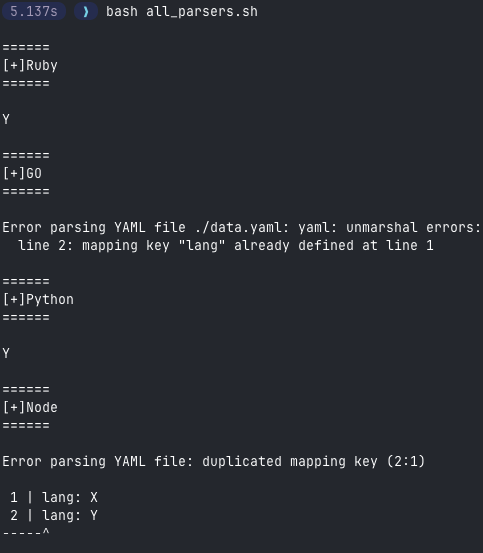
As I worked through my test setup, it quickly became clear that the main challenge would be avoiding the “duplicate keys” errors raised by Go and Node.js. By contrast, Ruby and Python parsers were far more permissive, silently accepting duplicate keys and simply using the last declared value.
lang: X
lang: Y
My next step was setting up two merges(!!merge and regexp <<), that both attempt to merge the same key, with different values.
<< : {lang: "X"}
!!merge : {lang: "Y"}
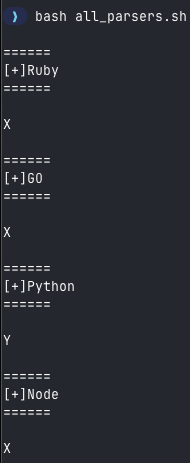
All implementations returned the first value except Python. This is fine, so long as we preserve that value after the first merge, we can control the Python Parser value.
Python- Ruby
- Node.JS
- Go
Tags as Anchor values
Next I used YAML anchors to reference the merge tag instead of directly calling it.
<< : {lang : "X"}

anything: &morge "<<"
*morge : {lang: "Y"}
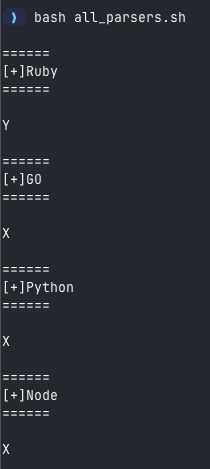
This output represented three wins: no duplicate-key errors, no formatting errors, and control over the value of the lang key in a single parser, the Ruby parser.
PythonRuby- Node.JS
- Go
Key Name Confusion
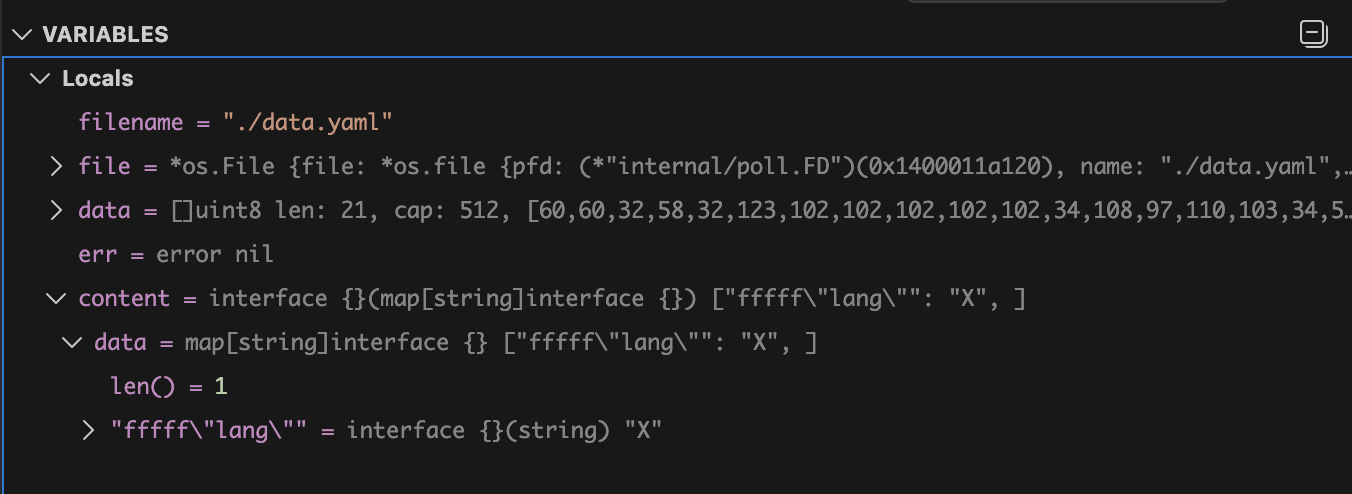
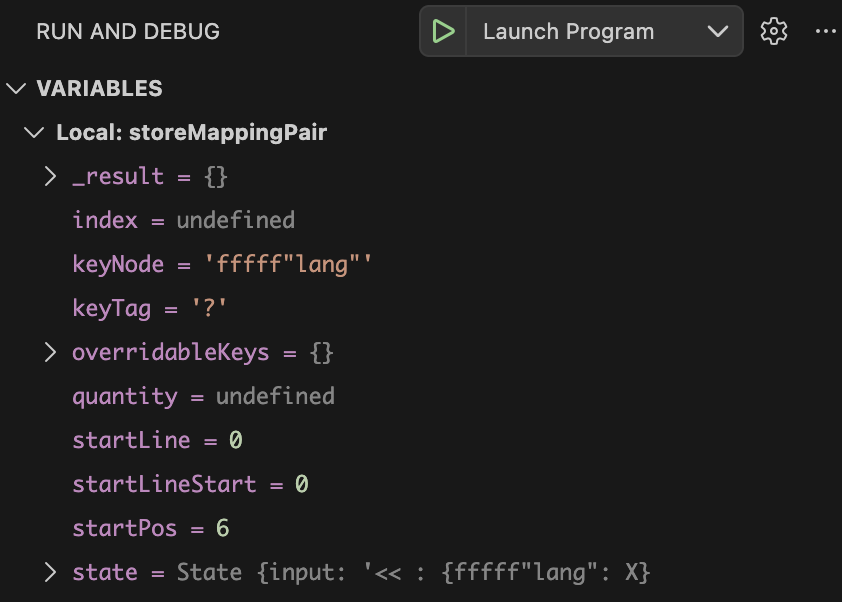
Next, we still need to find a way to control the values for the Go and Node.js parsers. We only have one key/tag left: <<. While debugging the parsers, I noticed that a string placed alongside a double-quoted string becomes part of the key name. For example:
<< : {fffff"lang": X, "lang": Y}
Go Parser:
Node.JS Parser
I decided to try prepending tags or indicators to the key base, specifically the complex key mapping indicator ?
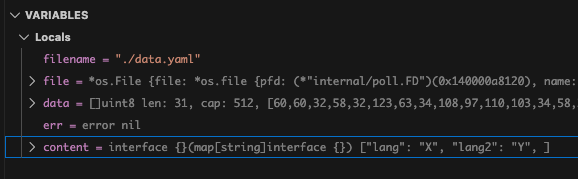
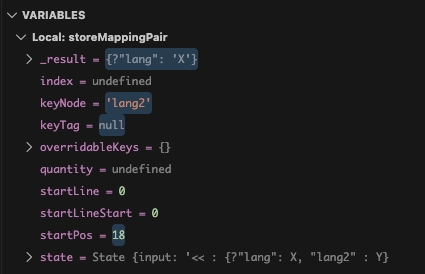
<< : {?"lang": X, "lang2" : Y}
My suspicions were confirmed: the Go parser identified the ? indicator, and did not store it in the key name, whereas Node.js included the ? in the name. I honestly don’t know which behaviour is correct here. For now, all that matters is that they disagree.
Go Parser
Node.JS Parser
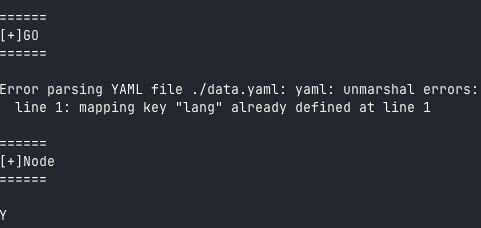
This alone doesn’t mean we can simply declare the “lang” key again and expect all parsers to be happy.
<< : {?"lang": X, "lang" : Y}
Node.js may skip the first key, but remember that Go treats the question mark as a complex-mapping indicator. As a result, Go will see the same key specified twice, and we get our old friend, the duplicate keys error, back.
Once again, I was out of ideas, so I decided to take another break. A couple of days later, while debugging the Python parser, I noticed that it recursively called flatten_mapping() on the MappingNode type when a merge was encountered.
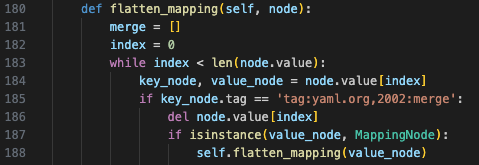
That kind of clicked, and I realized, why not try embedding a merge within another? If the Python Parser supports it, others might too.
<< : {?"lang": X, !!merge : {lang: Y}}
Success! We now controlled the parsers independently.
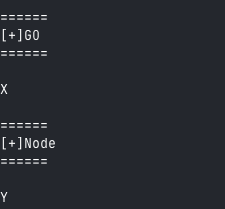
PythonRubyNode.JSGo
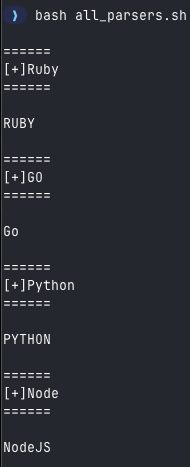
Putting it together
<<: {?"lang": Go, !!merge : {lang: NodeJS}}
dfl: &morge "<<"
*morge : {lang: RUBY}
!!merge : {lang: PYTHON}
End
I had a lot of fun putting this together, and I hope it proves useful to someone exploring this space. Thanks to Joernchen for the inspiration to try this out.